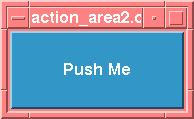
/* Written by Paula Ferguson.
 * Copyright 1994, O'Reilly & Associates, Inc.
 * Permission to use, copy, and modify this program without
 * restriction is hereby granted, as long as this copyright
 * notice appears in each copy of the program source code.
 * This program is freely distributable without licensing fees and
 * is provided without guarantee or warrantee expressed or implied.
 * This program is -not- in the public domain.
 */

/* action_area2.c -- a variation of action_area.c that uses the Motif 1.2
 * TemplateDialog to create a customized dialog.
 */
#include <Xm/PushB.h>
#include <Xm/LabelG.h>
#include <Xm/RowColumn.h>
#include <Xm/TextF.h>
#include <Xm/MessageB.h>

typedef struct {
    char *label;
    void (*callback)();
    XtPointer data;
} ActionAreaItem;

static void
    do_dialog(), close_dialog(), activate_cb(),
    ok_pushed(), clear_pushed(), help();

main(argc, argv)
int argc;
char *argv[];
{
    Widget toplevel, button;
    XtAppContext app;

    XtSetLanguageProc (NULL, NULL, NULL);

    toplevel = XtVaAppInitialize (&app, "Demos",
        NULL, 0, &argc, argv, NULL, NULL);

    button = XtVaCreateManagedWidget ("Push Me",
        xmPushButtonWidgetClass, toplevel, NULL);
    XtAddCallback (button, XmNactivateCallback, do_dialog, NULL);

    XtRealizeWidget (toplevel);
    XtAppMainLoop (app);
}

/* callback routine for "Push Me" button.  Actually, this represents
 * a function that could be invoked by any arbitrary callback.  Here,
 * we demonstrate how one can build a standard customized dialog box.
 * The control area is created here and the action area is created in
 * a separate, generic routine: CreateActionArea().
 */
static void
do_dialog(w, client_data, call_data)
Widget w; /* will act as dialog's parent */
XtPointer client_data;
XtPointer call_data;
{
    Widget dialog, rc, text_w;
    XmString string;
    Arg args[5];
    int n = 0;
    extern void CreateActionArea();
    static ActionAreaItem action_items[] = {
        { "OK",     ok_pushed,     NULL          },
        { "Clear",  clear_pushed,  NULL          },
        { "Cancel", close_dialog,  NULL          },
        { "Help",   help,          "Help Button" },
    };

    /* Create a TemplateDialog that will contain the control area
     * and the action area buttons for the dialog
     */
    string = XmStringCreateLocalized ("Dialog Shell");
    XtSetArg (args[n], XmNdialogTitle, string); n++;
    XtSetArg (args[n], XmNautoUnmanage, False); n++;
    dialog = XmCreateTemplateDialog (XtParent (w), "dialog", args, n);
    XmStringFree (string);

    /* now that the dialog is created, set the Cancel button's
     * client data, so close_dialog() will know what to destroy.
     */
    action_items[2].data = (XtPointer) dialog;

    /* create the control area which contains a
     * Label gadget and a TextField widget.
     */
    rc = XtVaCreateWidget ("control_area",
        xmRowColumnWidgetClass, dialog, NULL);
    string = XmStringCreateLocalized ("Type Something:");
    XtVaCreateManagedWidget ("label", xmLabelGadgetClass, rc,
        XmNlabelString,    string,
        NULL);
    XmStringFree (string);

    text_w = XtVaCreateManagedWidget ("text-field",
        xmTextFieldWidgetClass, rc, NULL);

    /* RowColumn is full -- now manage */
    XtManageChild (rc);

    /* Set the client data for the "OK" and "Clear" buttons */
    action_items[0].data = (XtPointer) text_w;
    action_items[1].data = (XtPointer) text_w;

    /* Create the action area. */
    CreateActionArea (dialog, action_items, XtNumber (action_items));

    /* callback for Return in TextField.  Use dialog as client data */
    XtAddCallback (text_w, XmNactivateCallback, activate_cb, dialog);

    XtManageChild (dialog);
    XtPopup (XtParent (dialog), XtGrabNone);
}

/* The next four functions are the callback routines for the buttons
 * in the action area for the dialog created above.  Again, they are
 * simple examples, yet they demonstrate the fundamental design approach.
 */
static void
close_dialog(w, client_data, call_data)
Widget w;
XtPointer client_data;
XtPointer call_data;
{
    Widget shell = (Widget) client_data;

    XtDestroyWidget (shell);
}

/* The "ok" button was pushed or the user pressed Return */
static void
ok_pushed(w, client_data, call_data)
Widget w;
XtPointer client_data;
XtPointer call_data;
{
    Widget text_w = (Widget) client_data;
    XmAnyCallbackStruct *cbs = (XmAnyCallbackStruct *) call_data;
    char *text = XmTextFieldGetString (text_w);

    printf ("String = %s\n", text);
    XtFree (text);
}

static void
clear_pushed(w, client_data, call_data)
Widget w;
XtPointer client_data;
XtPointer call_data;
{
    Widget text_w = (Widget) client_data;
    XmAnyCallbackStruct *cbs = (XmAnyCallbackStruct *) call_data;

    /* cancel the whole operation; reset to NULL. */
    XmTextFieldSetString (text_w, "");
}

static void
help(w, client_data, call_data)
Widget w;
XtPointer client_data;
XtPointer call_data;
{
    String string = (String) client_data;

    puts(string);
}

/* When Return is pressed in TextField widget, respond by getting
 * the designated "default button" in the action area and activate
 * it as if the user had selected it.
 */
static void
activate_cb(text_w, client_data, call_data)
Widget text_w;              /* user pressed Return in this widget */
XtPointer client_data;        /* dialog passed as client data */
XtPointer call_data;
{
    XmAnyCallbackStruct *cbs = (XmAnyCallbackStruct *) call_data;
    Widget dflt, dialog = (Widget) client_data;

    /* get the "default button" from the action area... */
    XtVaGetValues (dialog, XmNdefaultButton, &dflt, NULL);
    if (dflt) /* sanity check -- this better work */
        /* make the default button think it got pushed using
	 * XtCallActionProc().  This function causes the button
	 * to appear to be activated as if the user pressed it.
         */
        XtCallActionProc (dflt, "ArmAndActivate", cbs->event, NULL, 0);
}

void
CreateActionArea(dialog, actions, num_actions)
Widget dialog;
ActionAreaItem *actions;
int num_actions;
{
    Widget widget;
    int i;

    for (i = 0; i < num_actions; i++) {
        widget = XtVaCreateManagedWidget (actions[i].label,
            xmPushButtonWidgetClass, dialog,
	    XmNshowAsDefault, i == 0,
	    XmNdefaultButtonShadowThickness, 1,
            NULL);
	if (actions[i].callback)
            XtAddCallback (widget, XmNactivateCallback,
                actions[i].callback, actions[i].data);
        if (i == 0)
            XtVaSetValues (dialog, XmNdefaultButton, widget, NULL);
    }
}